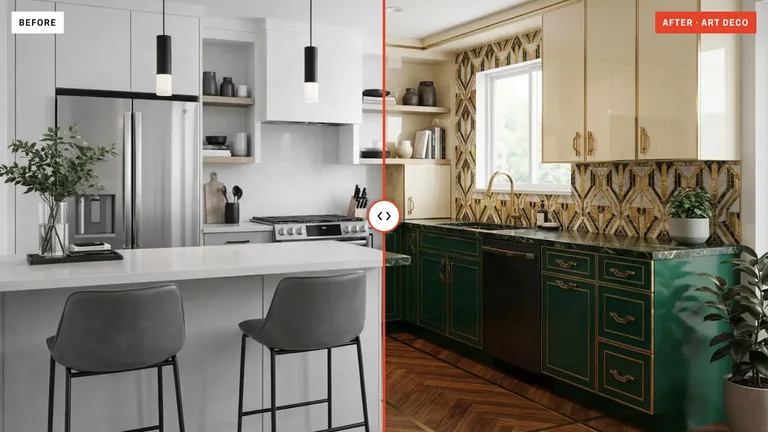
What Is AI Kitchen Design?
AI kitchen design is the process of using artificial intelligence to generate photorealistic redesigns of a kitchen from a photograph. Instead of hiring an interior designer or learning 3D modeling software, you upload a photo of your existing kitchen, select a style or provide custom instructions, and the AI produces a professional-quality render in seconds.
The technology behind AI kitchen design combines computer vision (the AI's ability to understand the spatial layout, surfaces, and objects in your photo) with generative image editing (painting a new aesthetic onto the existing structure). The result is an image that looks like a professional designer rendered your kitchen in a new style — but was produced in 10 to 20 seconds, on a plan from $19 a month.
Tools like KitchenDesign.app solve one problem of renovation planning: the gap between what you imagine and what you can see before anything is ordered.
How AI Kitchen Design Works
Most AI kitchen design tools, ours included, are built on an image-editing model: it receives your photo and a written description of the change, and paints a new photo of the same room from the same viewpoint. That is why results look like your kitchen and not a stock photo, and also why they can drift: a model that repaints the whole photo can move a window or bend a wall unless it is told not to, and the result is checked.
On KitchenDesign.app, a render takes four steps:
- Your photo, traced on your device. Before anything is sent, the app draws your room's lines, so you see the outer walls, windows and doors every render keeps.
- A written brief. The app writes the model a brief: your style's materials, colors and light, and what your mode keeps and may change (the outer walls, windows and doors always; in Refresh, every cabinet and appliance where it is).
- One image-editing model reads the photo and the brief together and paints the redesigned room from the same spot.
- Your render is saved beside the original, usually in 10 to 20 seconds. Then you can change any detail in words, and everything else stays.
It doesn't build a 3D model of your room, measure it, or know which walls carry load: it makes a photo of what the room could look like.
Best Use Cases for AI Kitchen Design
AI kitchen design is not a replacement for architectural drawings or structural engineering. It excels in specific phases of the renovation process:
- Style exploration: Test 15 architectural styles on your actual kitchen before committing to any aesthetic direction. This is the single highest-value use case.
- Contractor communication: Share AI-generated renders with your contractor to eliminate ambiguity. "Make it look like this" is far more effective than verbal descriptions or Pinterest boards.
- Budget planning: By visualizing different style tiers (e.g., budget-friendly Farmhouse vs. high-end Mediterranean), you can estimate material costs before getting quotes.
- Real estate staging: Virtually stage a dated kitchen for listings. Show buyers the potential without spending money on physical staging.
- Decision validation: Already picked your cabinet color? Generate a render to validate the decision before ordering. A render costs far less than a change order.
AI Kitchen Design vs. Traditional Interior Design
| Factor | Traditional Designer | AI Kitchen Design |
|---|---|---|
| Designer's rate | $65–$250 an hour (HomeAdvisor) | Free to browse |
| Full design package | $1,500–$3,000 (HomeAdvisor, mid-range) | From $19/month |
| Time to first render | About 10 to 20 hours of work | 10–20 seconds |
| Styles to explore | 2–3 concepts | 15 styles |
| Revision turnaround | 3–7 days | 10–20 seconds a refine |
| Layout preservation | Yes (measured) | Yes, in Refresh mode |
| Construction documents | Yes | No — use for visualization |
| Material sourcing | Yes | No — pair with retailer |
| Human creative judgment | Yes | Limited to trained styles |
The optimal approach for most homeowners is AI-first, designer-second. Use AI to narrow your style direction from 15 options down to 2-3 favorites, then bring those renders to a professional designer (or directly to a contractor) for detailed specification and execution.
Step-by-Step: How to Use AI Kitchen Design
- Take a kitchen photo. Use your smartphone. Natural lighting works best. Capture the widest angle possible — ideally showing at least two walls, the countertops, and major appliances.
- Upload to KitchenDesign.app. Create an account and choose a plan, from $19 a month. Click "Upload" and select your photo.
- Select a design style. Browse 15 styles or type custom instructions. Examples: "Modern with white shaker cabinets and marble countertops," "Warm Farmhouse with butcher block and open shelving."
- Generate and compare. Hit "Redesign." In 10 to 20 seconds, you'll see a photorealistic render. Generate multiple styles to compare side-by-side.
- Download and share. Download your favorites and share them with family, your contractor, or your designer. The AI renders serve as a visual brief that eliminates miscommunication.
For a more detailed walkthrough with photos, see our dedicated AI kitchen design from photo guide.
15 Kitchen Design Styles Available
One of the greatest advantages of AI kitchen design is the ability to explore all 15 styles on your actual kitchen. Here are the most popular categories:
- Modern / Contemporary: Clean lines, flat-panel cabinets, minimal hardware, monochromatic palettes.
- Scandinavian: Light wood tones, white surfaces, natural materials, maximum brightness.
- Farmhouse / Country: Shaker cabinets, open shelving, warm wood, subway tile backsplash.
- Industrial: Exposed brick/metal, dark tones, concrete countertops, pendant lighting.
- Mediterranean: Warm terracotta, ornate tile work, arched details, rich wood.
- Art Deco: High-gloss lacquer, brass inlays, bold marble and geometric tile — glamorous and luxurious.
- Mid-Century Modern: Warm wood, bold accent colors, retro-inspired hardware.
- Coastal: Blue-white palette, natural textures, sea-glass accents, airy feel.
Browse the full collection on our kitchen design styles page. Each style includes material recommendations, color palettes, and budget estimates.
Cost Analysis: AI Kitchen Design vs. Alternatives
To put AI kitchen design in financial context:
- AI kitchen design tool: from $19 a month on KitchenDesign.app.
- Independent kitchen designer: $1,500 to $3,000 for a mid-range project (HomeAdvisor).
For the visualization and style exploration phase, a month of the cheapest plan costs 98% less than the low end of a designer's fee. A designer still does what AI can't: measure, specify and stand behind the plan (below).
Limitations & When to Hire a Professional
AI kitchen design is powerful but not universal. Know its boundaries:
- No structural engineering: AI cannot assess load-bearing walls, plumbing routing, or electrical capacity. For structural changes, hire a licensed contractor.
- No precise measurements: AI works from photos, not blueprints. If your remodel requires exact dimensions (custom cabinetry, granite slab ordering), you need physical measurement.
- Style transfer, not creation: AI applies known styles — it doesn't invent entirely novel aesthetics. For truly bespoke design, a human designer adds creative value.
- Material sourcing: AI shows what materials look like but doesn't source them. You'll need to match the AI's output with real products from retailers.
The bottom line: use AI for the first 80% (visualization, style exploration, decision validation) and professionals for the last 20% (structural, specification, construction).
Frequently Asked Questions
What is AI kitchen design?
AI kitchen design uses an image-editing AI model to redesign a kitchen from a photograph: you upload a photo, choose a style or describe the change, and the model paints the same room, from the same viewpoint, in seconds. Good tools keep the walls, windows and doors where they are.
How much does AI kitchen design cost?
Some AI kitchen design tools offer free tiers. On KitchenDesign.app, looking is free and renders of your own photo are on plans from $19 a month. HomeAdvisor puts an independent kitchen designer at $1,500 to $3,000 for a mid-range project.
Can AI design a kitchen from scratch?
Current AI kitchen design tools work best as 'style transfer' engines — they transform an existing kitchen photo into a new style. They preserve structural elements and reimagine finishes, materials, and colors. For from-scratch floor plan creation, pair AI visualization with a traditional floor plan tool.
Is AI kitchen design accurate enough for construction?
AI kitchen designs are photorealistic and accurate for style, color, and material visualization. They're excellent for communicating design intent to contractors. However, they are not architectural drawings — you still need precise measurements and structural engineering for construction documents.
Which AI kitchen design tool should I use?
It depends on what you need: a few free ideas, many versions of one room, or renders for clients. Our comparison sets out each tool's free allowance and price. KitchenDesign.app is built for kitchens: 15 styles, renders in 10 to 20 seconds, and your outer walls, windows and doors kept in every mode; it is paid only, from $19 a month.