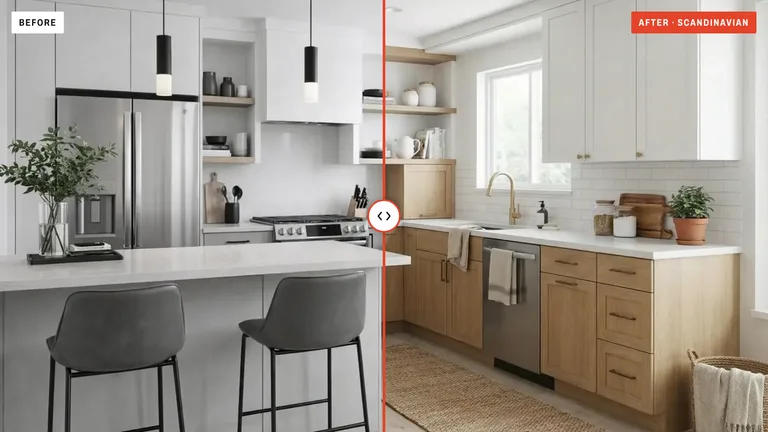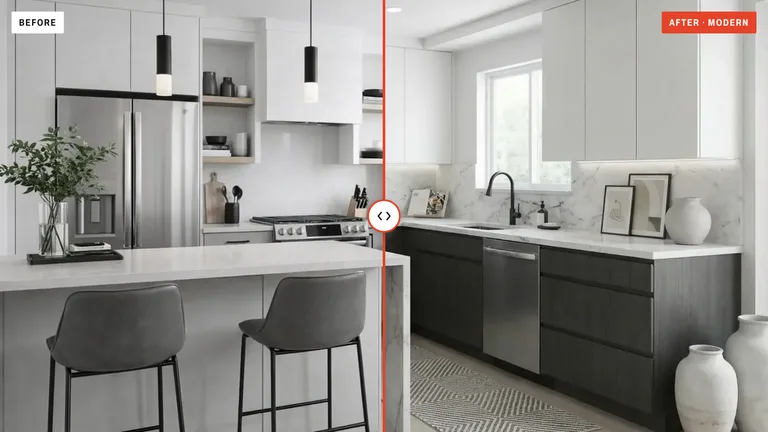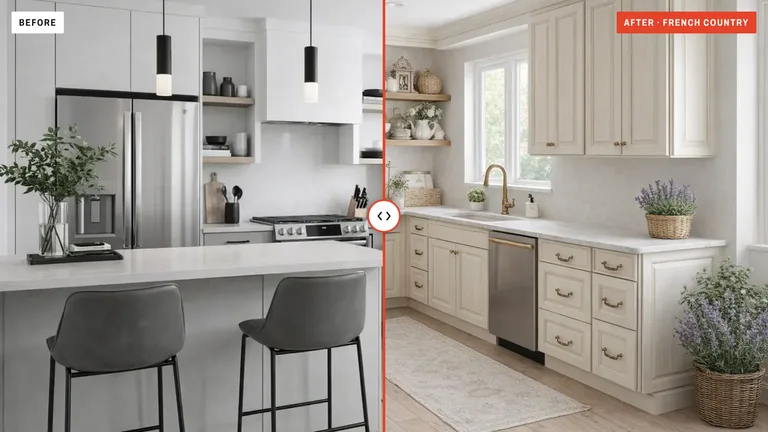
Kitchen remodels used to start with a contractor visit and a five-figure quote. Now they start with a phone photo and an AI tool. Here's how to use artificial intelligence to plan, visualize, and execute a kitchen renovation — without the usual headaches.
What Is an AI Kitchen Remodel?
An AI kitchen remodel is when you use artificial intelligence to visualize how your kitchen would look after a renovation — before you spend any money. You upload a photo of your current kitchen, choose a style, and the AI generates a realistic image of the redesigned space.
Think of it like a fitting room, but for your kitchen. You get to "try on" different looks — modern cabinets, farmhouse charm, sleek minimalism — and see exactly what they'd look like in your actual room. No demolition required.
This is different from traditional design software. You don't need to learn CAD or spend hours dragging virtual furniture around. With AI, the render itself takes 10 to 20 seconds.
Why Are People Using AI to Remodel Kitchens?
The short answer: it saves time, money, and stress. But let's break it down.
- Save MoneyTest ideas before committing to expensive materials. Many homeowners avoid costly design mistakes this way.
- Save TimeGet a full visual concept in 10 to 20 seconds instead of the 10 to 20 hours of work HomeAdvisor gives a designer's plan.
- Reduce RiskSee exactly what dark cabinets or open shelving would look like before you rip anything out.
- Explore FreelyTry 10 different styles on the same photo. There's no penalty for experimenting.
A traditional kitchen remodel costs between $15,000 and $50,000 on average. HomeAdvisor puts an independent kitchen designer at $1,500 to $3,000 for a mid-range project. Using an AI kitchen remodel tool to plan first means you walk into that contractor meeting already knowing what you want — and that alone can save you thousands in change orders.
How to Remodel Your Kitchen with AI: Step by Step
Whether you're planning a full gut renovation or just want to update the look of your cabinets, the process is the same. Here's how it works.
1. Photograph Your Current Kitchen
Take a clear photo from a corner or doorway. Capture as much of the room as possible — cabinets, counters, floor, and backsplash. Natural light gives the best results.
2. Choose Your AI Remodel Tool
Pick a tool that specializes in kitchens (not a general image generator). KitchenDesign.app is built specifically for kitchen remodels — it understands cabinets, layouts, and appliances.
3. Select a Remodel Style
Browse design styles: Modern, Scandinavian, Industrial, Farmhouse, Coastal, Mediterranean, and more, or describe your own. You can also type custom instructions like "white shaker cabinets, quartz counters, matte black hardware."
4. Generate and Compare
Hit generate and wait 10 to 20 seconds. The AI will produce a photorealistic version of your remodeled kitchen. Run it again with a different style to compare options side by side.
5. Take It to Your Contractor
Download your favorite designs and bring them to your contractor meeting. Now you have a visual reference that's based on YOUR actual kitchen — not a Pinterest photo of someone else's home.
What Can an AI Remodel Actually Change?
A lot more than you'd expect. The best AI kitchen remodel tools don't just change colors — they understand the structure of the room and swap out actual elements. Here's what's on the table:
- Cabinets — change the door style, color, finish, and hardware. Go from raised panel oak to flat-front white in one click.
- Countertops — swap laminate for marble, butcher block for granite, or solid surface for quartz.
- Backsplash — try subway tile, herringbone, Moroccan patterns, or a clean full-slab look.
- Flooring — hardwood, tile, concrete, patterned vinyl — all rendered realistically.
- Wall color and paint — see how a sage green or navy accent wall would actually look.
- Lighting mood — warm vs cool, bright vs moody. The AI adjusts the overall feel.
- Overall style — completely transform from traditional to modern, or coastal to industrial.
Pick Refresh and it won't move your plumbing: AI remodel tools are about visual transformation, and Refresh keeps your sink, stove, and fridge exactly where they are. (Remodel and Reimagine may re-plan them, so they show ideas a contractor would need to price.) And honestly, for most remodels keeping them is exactly what you want. Most kitchen renovations are cosmetic upgrades, not full gut jobs.
AI Kitchen Remodel vs. Hiring a Designer
Let's be clear: AI isn't replacing interior designers. But for the planning and exploration phase, it's hard to beat. Here's how they compare.
| AI Remodel Tool | Traditional Designer | |
|---|---|---|
| Cost | From $19/month | $1,500–$3,000 (HomeAdvisor, mid-range) |
| Speed | 10–20 seconds | About 10 to 20 hours of work |
| Iterations | 15 styles, or your own | 2–3 concepts |
| Personalization | Based on your photo | Based on your photo + consultation |
| Best For | Exploring ideas, planning | Final design + project management |
The smart approach? Use AI first to figure out what you actually want. Then bring your favorites to a designer or contractor. You'll save time on both sides.
Choosing an AI Kitchen Remodel App
Not every AI app is built for remodeling. Some are general-purpose image generators that produce beautiful but structurally inaccurate rooms. For a kitchen remodel app, you need one that understands cabinets, appliances, and spatial layout. Ours is below; for the other tools, their free allowances and prices, see AI kitchen design tools compared. Ours runs right in your browser on any phone or computer, with nothing to install.
- Ours
KitchenDesign.app
Purpose-built for kitchen remodels. Refresh keeps your exact layout and applies realistic material changes. 15 styles, custom instructions, and results in 10 to 20 seconds. Plans from $19 a month.
- Outer Walls Kept
- 15 Styles
- Custom Instructions
- Your Photo Traced First
Real Remodel Planning Tips
AI gives you the vision. But a successful kitchen renovation also needs some practical planning. Some practical tips.
- Start with your biggest pain pointDon't try to change everything at once. If your cabinets bother you the most, focus the AI on cabinet-style changes first. See what that alone does to the room.
- Generate at least 5 variationsThe first result is rarely the best one. Try different styles, tweak your instructions, and compare. You'll often land on something unexpected.
- Save your favorites and sleep on itDownload the designs you love and look at them the next day. The ones that still excite you after 24 hours are the ones worth pursuing.
- Show them to your householdOne of the biggest advantages of AI remodeling is that it ends the "I can't picture it" argument. Everyone can see exactly what the kitchen would look like.
- Use the designs in contractor conversationsPrint your top AI designs or show them on your phone. Contractors love visual references — it speeds up quoting and reduces misunderstandings.
How Much Does an AI Kitchen Remodel Cost?
Some AI kitchen remodel tools offer a free tier so you can try before you pay. On KitchenDesign.app, you can browse the styles and a sample kitchen's before and after for free; renders of your own photo need a plan. (Wondering about the renovation itself? See our full kitchen remodel cost guide for real 2026 prices by size and budget.)
If you want to see your own kitchen transform (and most people do, because it's genuinely exciting), plans start at $19 a month. Compare that to the $1,500 to $3,000 HomeAdvisor says an independent kitchen designer charges for a mid-range project and the value is obvious.
Some people look at the sample renders first, then subscribe for a single month while they're actively planning their renovation, and cancel when the plan is settled. That's a perfectly good strategy.
Common Questions About AI Kitchen Remodels
Can AI replace my contractor?
No, and it's not trying to. AI handles the visual planning part of a remodel. You still need a contractor for demolition, plumbing, electrical, and installation. AI just makes sure you both agree on what the finished product should look like.
Will the AI design match the final result?
Closely enough to plan with. The AI renders realistic materials, lighting, and proportions — it's not just a rough sketch.
Does AI work for small kitchens?
Absolutely. In fact, small kitchens benefit the most because every design choice has a bigger visual impact. The AI handles galley kitchens, L-shapes, U-shapes, and single-wall layouts equally well.
Can I use AI for just the countertops or backsplash?
Yes. If you type specific instructions like "keep everything the same but change the countertops to white marble," most good tools will follow that guidance. You don't have to change the whole room.
Is AI kitchen renovation free?
Looking is free. KitchenDesign.app lets you browse all 15 styles without login; renders of your own photo are on plans from $19 a month, each with a set number of renders.
The Bottom Line
An AI kitchen remodel is the smartest first step you can take before spending real money on a renovation. It costs almost nothing, takes seconds, and gives you a clear visual of what your kitchen could become.
Whether you're dreaming about a full kitchen makeover or just wondering what new countertops would look like, start with a photo. Upload it, pick a style, and see for yourself. You might discover that the kitchen you've been imagining is only a few changes away from the one you already have.