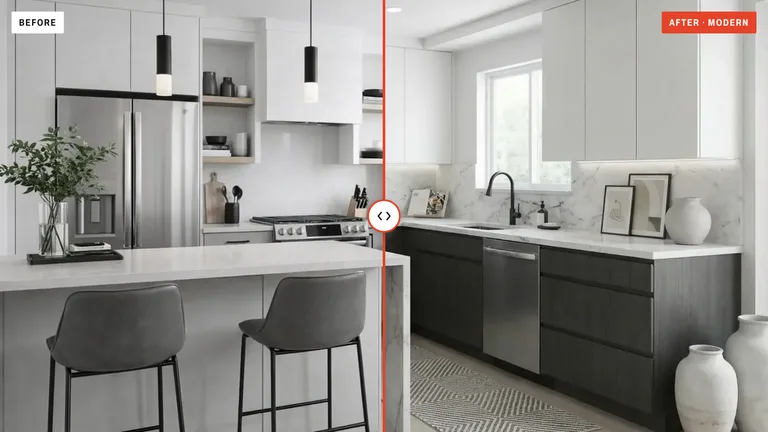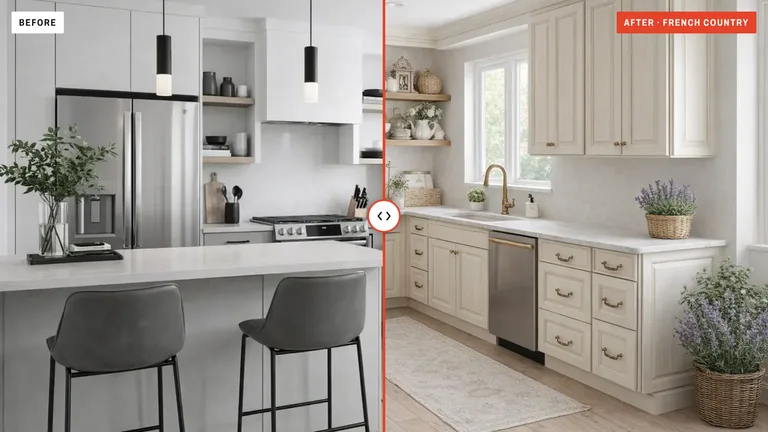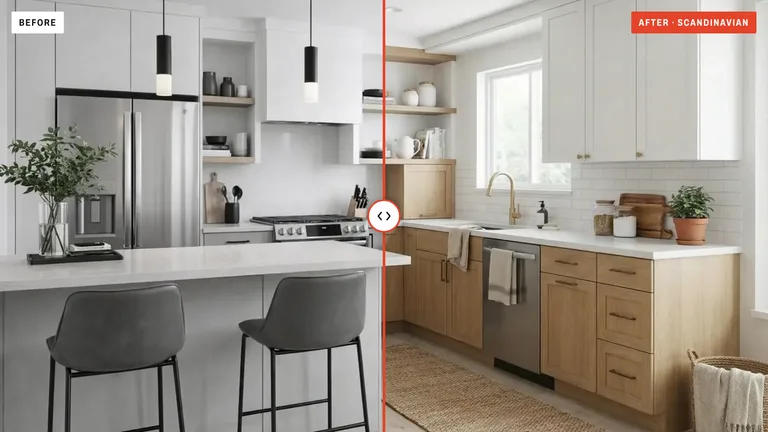
You don't need a designer, a blueprint, or any special software. All you need is a photo of your kitchen and an AI tool. In less than a minute you can see exactly what your kitchen would look like in a completely different style.
Why Start with a Photo?
Here's the thing most people don't realize: AI kitchen design from a photo is the fastest way to explore renovation ideas — and it's surprisingly accurate. You snap a picture of your current kitchen, upload it, and the AI gives you back a realistic image of how it could look with new cabinets, countertops, colors, or a totally new style.
No measuring tape. No floor plans. No calling a contractor just to see your options. You just take a photo with your phone and let the AI handle the rest.
This is why homeowners are turning to AI kitchen design with photo tools before they spend a single dollar on their remodel. It lets you test bold ideas without any risk.
What You Need to Get Started
The barrier to entry is almost zero. Here's what you need:
- A phone or camera (any quality works)
- One clear photo of your kitchen
- An AI kitchen design tool (like KitchenDesign.app)
- A rough idea of what style you want
That's it. You don't need a professional camera or perfect lighting. Most AI tools today are smart enough to work with everyday photos, even ones taken on older phones.
How It Works: Step by Step
Let me walk you through the exact process. It's much simpler than you'd think.
Step 1: Take a Photo of Your Kitchen
Stand in the doorway or a corner so you capture as much of the room as possible. Try to get the cabinets, countertops, and floor in the frame. Natural daylight works best, but it's not required.
Step 2: Upload It to an AI Design Tool
Open an AI kitchen design app (we recommend KitchenDesign.app) and upload your photo. The app sends it, with a brief for your style and mode, to an image-editing AI model that redraws the room.
Step 3: Pick a Style
Choose a design style — Modern, Scandinavian, Farmhouse, Industrial, or any of the 15 styles. You can also type specific instructions like "white shaker cabinets with marble countertops" to guide the AI.
Step 4: Get Your AI Redesign
Hit generate and wait 10 to 20 seconds. The AI produces a photorealistic image of your kitchen redesigned in your chosen style. Your outer walls, windows and doors stay where they are, and in Refresh mode the whole layout does too.
Tips for Getting the Best Results
A few things make a big difference in the quality of the AI output.
- Shoot from a corner, not straight onA slight angle gives the AI more depth information. It can better understand where cabinets end and walls begin.
- Keep the floor visibleEven a small strip of floor helps the AI understand scale. Without it, proportions can look slightly off.
- Remove clutter from countertopsToasters, fruit bowls, and cutting boards confuse the AI. A clean counter gives you a much cleaner result.
- Use natural light when possibleOverhead fluorescent light casts weird shadows. If you can, open a blind or turn off the ceiling light and shoot during the day.
- Try multiple styles on the same photoOne photo, five styles. That's the real power here. Compare Modern vs. Farmhouse vs. Coastal side by side before making any decisions.
What Can AI Actually Change in Your Photo?
People often ask: "Will it just slap a filter on my kitchen?" The answer is no. A good AI kitchen design from photo tool does real work under the hood. Here's what it can change:
- Cabinet style and color — flat panel to shaker, dark walnut to bright white
- Countertop material — laminate to marble, butcher block to quartz
- Backsplash design — subway tile, herringbone, or full slab stone
- Flooring — tile to hardwood, vinyl to concrete
- Hardware and fixtures — matte black handles, brass faucets
- Overall aesthetic — completely swap from Traditional to Modern or Scandinavian
- Wall color and lighting feel — warm tones, cool tones, brighter or moodier
And the critical part: in Refresh mode it does all this while keeping your layout unchanged. Your sink stays where it is. Your window stays put. The fridge doesn't move to the wrong wall. (Remodel and Reimagine may move cabinets and appliances; your outer walls, windows and doors stay in every mode.) That's what separates a real architectural AI from a basic image filter.
Who Is This For?
Homeowner Planning a Remodel
- See your options before calling a contractor
- Compare 5 styles in 5 minutes
- Show your partner exactly what you mean
- Explore before paying a designer
Pro Designers & Contractors
- Create client presentations from one photo
- Win more bids with visual proof
- Speed up the approval process
- Build a portfolio without staging
How Accurate Is It?
This is the question everyone asks, and it's a fair one. The truth is, AI kitchen design from a photo has gotten remarkably good. The output you get today looks like something a professional interior designer would produce — not a blurry sketch.
The AI preserves perspective lines, keeps lighting consistent, and applies materials that actually make physical sense. If you choose marble countertops, the AI adds realistic veining. If you pick oak floors, you'll see grain patterns and proper reflections.
Is it perfect? Not always. Occasionally, a small detail like a cabinet handle might look slightly off. But for the purpose of exploring ideas and making decisions, it's more than good enough.
Common Mistakes to Avoid
A few things can trip up new users. Here's what to watch out for:
- Uploading a blurry photo. The AI can work with average quality, but a very blurry or dark image will give mediocre results. Just make sure the photo is in focus.
- Expecting a floor plan. AI photo redesign is about visual aesthetics, not architectural blueprints. It won't move walls or change the room shape.
- Skipping the instructions field. Most tools let you type extra guidance. Use it. "White cabinets, dark floor, gold hardware" gets you a much more targeted result than just picking "Modern."
- Only trying one style. The whole point is to explore. Try at least three or four different looks on the same photo. You might surprise yourself.
Is It Really Free?
Looking is. On KitchenDesign.app, the styles and a sample kitchen's before and after are free to browse, with no account. Renders of your own photo need a plan: upload your kitchen photo, pick a style, and get a full AI redesign.
When you want designs of your own kitchen (and most people do — it's kind of addictive), plans start at $19 a month, cancel anytime.
The Bottom Line
AI kitchen design from a photo is the simplest, fastest, and cheapest way to figure out what you actually want before you renovate. No more flipping through Pinterest boards trying to imagine how that Scandinavian style would look in your specific kitchen. Just take a photo, upload it, and see it for yourself.
The technology is here, it works, and it's getting better every month. Whether you're a homeowner dreaming about a new kitchen or a contractor trying to win more projects, starting with a photo is the smartest first step you can take.